|
Instructions For
Doing Online Data Entry Typing Job
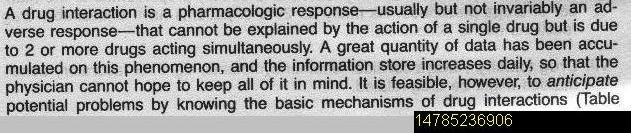
1. Type the Text Matter As given in the image file
in the above text box.
2. Type as it is. Do not make any spelling
corrections.
3. After every full stop, Comma, Semi colon put 2
blank spaces. In case of numeric or decimals, do not
put space after decimals. For example in case of
0.25, type as 0.25, if type like 0. 25, it will be
considered mistake.
4. You've to work in plain text, nothing to worry
about bold, italics etc. Just type plain text
continuously.
5. In case of paragraph, put one line space.
6. In case you see any Indent (space) before
starting of the line, you don't have to put any
space or indent before the line.
7. In case you find any special character or symbol
which cannot be typed using keyboard, just put a
blank space.
8. All you've to do is just Type the Assignment with
a minimum of 98% Accuracy means you should not make
more than 2 spelling mistakes including full stops
and commas to get paid.
9. Do not type the FILE No. mentioned at the end of
each Assignment, in the text box. 10. Click Submit
button After filling all the relevant information
required in the Right Side Panel, otherwise your
work will not be Accepted.
11. The above Assignments are for demo purpose only,
its just to test how the exact work will be and for
practice purpose. You won't be paid anything for the
demo work & you won't be getting any accuracy report
for the demo work. |